Journey map, Compass and Scout: following an online lead all the way to closing
By Andy Mazzolini
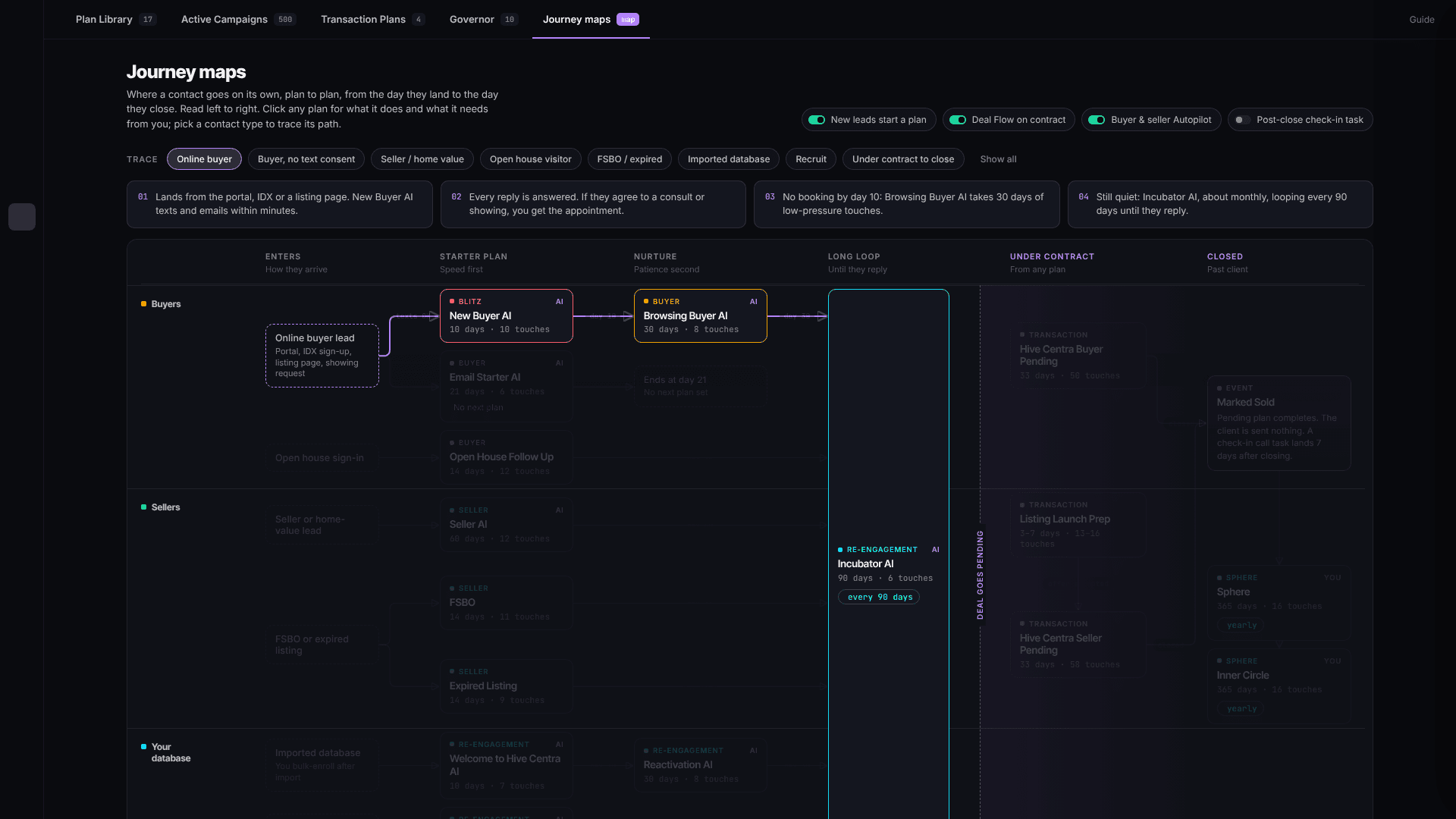
Most agents can tell you what their follow-up plans are called. Very few can tell you, for a specific lead, what happens on day 11 if the lead never wrote back. The answer lived in a dozen plan settings, and nobody draws that picture by hand more than once.
So we drew it for you.
Journey map: the whole follow-up on one screen
Open the Follow Up room and it now starts on Journey map. Read it left to right:
- Enters: how the contact arrived. An IDX sign-up, a home value request, an open house sign-in, an expired listing, an imported database.
- Starter plan: speed first. The first days after someone raises their hand.
- Nurture: patience second, for people who are interested but not ready.
- Long loop: until they reply. Nobody falls off the end.
- Under contract: the transaction plans that take over once a deal goes pending.
- Closed: the past client and sphere plans that keep the relationship going.
The map is built from your live plans, not typed up once and left to rot. When a plan changes, the map changes. If a plan ends with nowhere to go next, the map says so in amber instead of hiding the gap. Plans the AI works on its own carry an AI badge, and the switches across the top show what is on for your account: new leads start a plan, Deal Flow on contract, the buyer and seller Autopilot.
Pick a contact type in the Trace row and the map lights up that one path, with the steps spelled out above it. The cover image of this post is that view, traced for an online buyer.
The online buyer, step by step
Here is what the map shows for the lead most agents pay the most to get: someone who found a home online and signed up to see more.
1. The first five minutes. The lead lands from your IDX site, a listing page or a showing request. New Buyer AI texts and emails within minutes, as your assistant, and answers every reply. If the lead did not give consent to text, Email Starter AI takes the same job by email only. Speed to lead is not a setting you have to remember to turn on. It is the first box on the map.
2. Scout brings the homes. A buyer who signs up told you what they want: area, price, beds, must-haves. Scout matches that against live MLS listings and puts the match alerts on the buyer's profile. Tick the homes you like and send them by text or email in one step. The buyer assistant can send listings itself while it works the conversation, and homes you already sent stay out of the daily digest so nobody gets the same house twice. On your IDX site, visitors can search near a road or a landmark, closest first, and ask questions about a listing that are answered from the full MLS record.
3. The appointment comes to you. The goal of the starter plan is one thing: a consult or a showing. When the lead says yes, the appointment is yours, and what you log afterwards decides what happens next. A no-show reopens the thread aiming at a rebook. An appointment that held pauses the automation and files a follow-up task on you.
4. Not ready is not lost. No booking by day 10 and the lead moves to Browsing Buyer AI: 30 days of low-pressure touches. Still quiet after that and Incubator AI checks in about once a month, looping every 90 days until they reply. A reply like "not until spring" pushes the plan out instead of stopping it. Every one of those transitions is a labelled arrow on the map.
5. Under contract to close. When the deal goes pending, the transaction plan takes over from whatever plan the contact was on. Closer reads the contract once and every date, party, earnest money and option fee lands on the file after you confirm it. When the deal is marked sold the contact moves to Closed, and the past client plans pick them up.
Compass keeps you in the loop the whole way
Automation can carry a lead a long way. It cannot replace you at the moments that matter. Compass is the assistant that makes sure you are there for them.
- The Daily Brief opens with the replies waiting on you, then today's appointments, your listings, your pace to goal and what the AI team did overnight.
- Text it from your phone. Ask Compass who replied, what a thread said, or when the option period ends, from a text message, the app, or the panel on any screen.
- It walks the contract. Earnest money, title, survey, financing, option period and closing come back in date order, each labelled with where it came from, and Compass speaks up when a close date in the CRM disagrees with the contract.
- It takes the busywork. Hand it a listing intake and it finds the owner of record, creates the seller contact and opens the deal. Hand it a longer job and it works on it in the background and texts you when it needs a decision.
Where this is going
We built the Journey map because "is my follow-up working" should be a question you can answer by looking, not by opening twelve settings screens. We are not putting conversion numbers in this post yet. When the first leads that came in through a Hive Centra IDX site reach the closing table, we will share what happened, with the numbers behind it.
In the meantime, open the Follow Up room, pick Online buyer in the Trace row, and see the path your next online lead will take.
Common questions
What is the Journey map in Hive Centra?
The Journey map is a tab in the Follow Up room that shows every automated plan as one left-to-right map: how a contact arrives, the starter plan, nurture, the long loop, under contract and closed. It is built from your live plans, and you can pick a contact type such as Online buyer to light up the exact path that contact will take.
What happens when an online lead signs up on my IDX site?
New Buyer AI texts and emails within minutes and answers every reply. If the lead agrees to a consult or showing, you get the appointment. If they do not book by day 10, Browsing Buyer AI takes 30 days of low-pressure touches, then Incubator AI checks in about monthly, looping every 90 days until they reply.
How do Scout and Compass fit into the follow-up?
Scout matches the buyer's search to live MLS listings and lets you send the homes you pick by text or email, or lets the buyer assistant send them during the conversation. Compass is your assistant across the whole file: it surfaces the replies waiting on you, drafts what to say, and once the buyer is under contract it walks every contract date in order until closing.
Ready to run a team, not a database?
Start now and watch an AI team learn your business from day one.